11 KiB
1.1 WDS Presentation
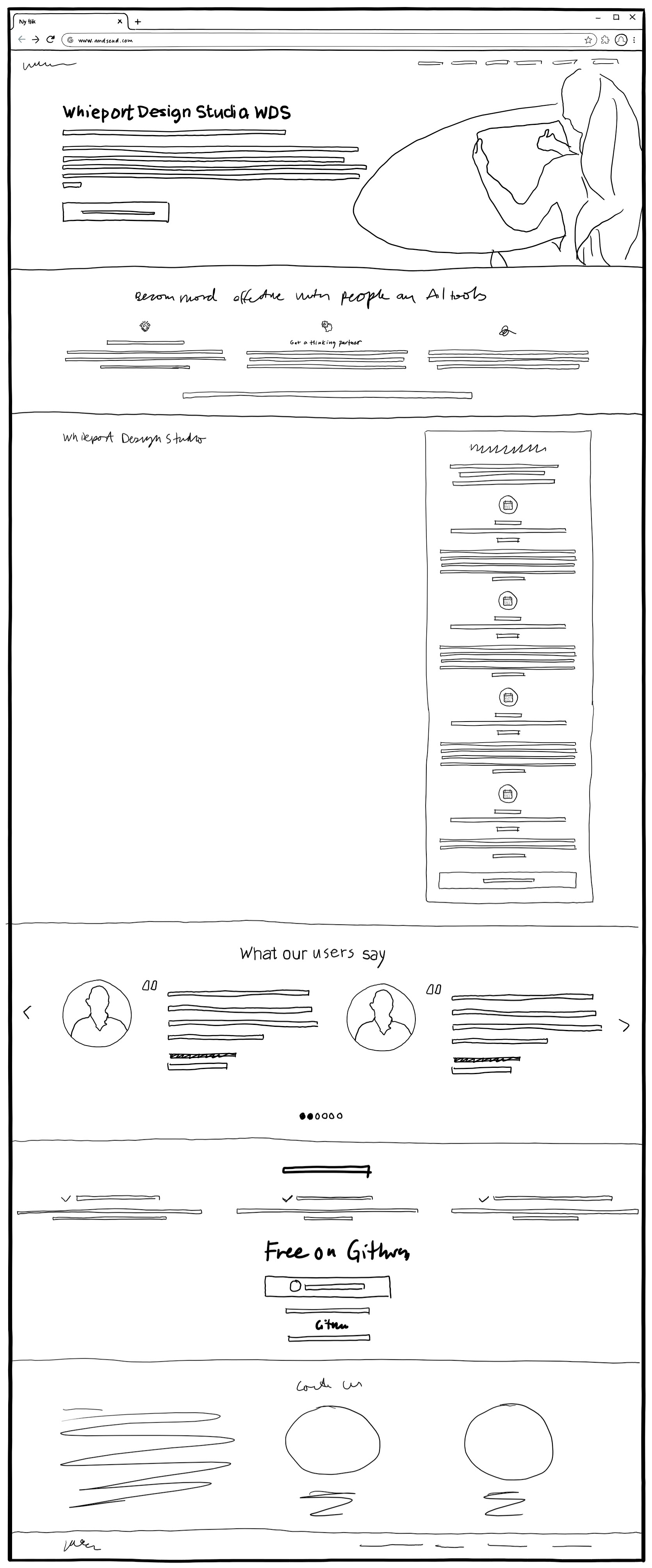
1.1 WDS Presentation
The WDS Presentation page serves as the primary entry point for designers discovering WDS for the first time. This page addresses the universal pain point of feeling threatened and overwhelmed by AI while promising the emotional transformation to empowered strategic leadership. The page must convert curious visitors into engaged learners by demonstrating immediate value and removing adoption barriers.
User Situation: Stina the Strategist, a designer feeling overwhelmed by AI disruption, job hunting, AI-curious but lacking confidence. She's skeptical but hopeful - doesn't want to waste time on another tool. Needs quick value assessment: "Is this worth my time?"
Page Purpose: Convert visitors into learners/users by addressing core emotional drivers from the trigger map - eliminating overwhelm while building confidence that designers can thrive (not just survive) in the AI era through structured methodology and strategic leadership.
Reference Materials
Strategic Foundation:
- Product Brief
- Content Strategy - Messaging guidelines and tone
- Trigger Map
- Stina Persona
- Feature Impact
Design Principles:
- Build confidence, don't overwhelm - Progressive disclosure
- Show tangible value fast - "You'll create THIS"
- Make AI friendly - Co-pilot language, not replacement
- Provide structure - Clear path forward
- Prove credibility - BMad foundation, real results
Success Metrics:
- Engagement: 3+ min time on page, 40%+ scroll to capabilities, 20%+ click GitHub/course
- Conversion: 10%+ click CTA, 5%+ watch Module 01, 2%+ clone repository
Page Sections
Hero Object
Purpose: Capture attention and communicate core value in 5 seconds
Strategic Rationale: See Content Strategy - Hero Section for messaging decisions and psychology.
Main Headline
OBJECT ID: wds-hero-headline
- Component: H1 heading
- Content:
- EN: "Whiteport Design Studio, WDS"
- Rationale: Clear, branded, professional. Not trying to be clever.
Battle Cry Tagline
OBJECT ID: wds-hero-tagline
- Component: H2 heading
- Content:
- EN: "Shoulder the complexity, break it down using AI as your co-pilot. Not as a burden, but with excitement. Not as a task, but as a calling!"
- Rationale: Acknowledges complexity (honest), positions AI as helper (co-pilot), emotional shift: burden → calling
Hero Body Copy
OBJECT ID: wds-hero-body
- Component: Body text paragraph
- Content:
- EN: "Free and open-source design methodology and AI agents for designers who mean business. Transform from overwhelmed task-doer into empowered strategic leader. Create specifications that become AI-ready super-prompts, preserving your design intent through to implementation. Built on 25 years of proven methodology. For designers everywhere."
- Rationale: Line 1 establishes category + audience, Line 2 shows transformation journey, Line 3 builds credibility (25 years) + accessibility
Primary CTA Button
OBJECT ID: wds-hero-cta
- Component: Button
- Content:
- EN: "Get WDS Now - Free on GitHub"
- Link:
https://github.com/whiteport/wds - Rationale: Action-oriented ("Get" not "Learn More"), transparency ("Free on GitHub"), single CTA reduces decision paralysis
Hero Illustration
OBJECT ID: wds-hero-illustration
- Component: Hero image
- Content: Designer working with specifications/tablet visual
- Note: Illustration shows designer as expert with specifications, matches existing Whiteport style
Benefits Section
Purpose: Quickly grasp the three key differentiators
[To be completed]
WDS Capabilities Object (Right Column)
Purpose: Show designers what they can accomplish with WDS through actionable phases
Strategic Rationale: See Content Strategy - Capabilities Section for messaging decisions and psychology.
Section Headline
OBJECT ID: wds-capabilities-headline
- Component: H2 heading
- Content:
- EN: "What You Can Create with WDS"
- Rationale: Direct, action-oriented, focuses on designer capability
Phase 1: Win Client Buy-In
OBJECT ID: wds-capability-phase-1
- Component: Capability card
- Icon: 🎯 (target/presentation)
- Content:
- Title (EN): "Win Client Buy-In"
- Description (EN): "Present your vision in business language that stakeholders understand. Get everyone aligned on goals, budget, and commitment before you start. Stop projects from dying in "maybe" meetings. Saga helps you articulate value and create professional agreements."
- Output (EN): "→ Pitch & Service Agreement"
- Link:
https://github.com/whiteport/wds/tree/main/src/modules/wds/course/deliverables/project-pitch.md
Phase 2: Define Your Project
OBJECT ID: wds-capability-phase-2
- Component: Capability card
- Icon: 📋 (clipboard/document)
- Content:
- Title (EN): "Define Your Project"
- Description (EN): "Get crystal clear on what you're building, who it's for, and why it matters. Create a strategic foundation that guides every design decision. No more scope creep or confused teams. This brief becomes your north star when things get messy."
- Output (EN): "→ Product Brief"
- Link:
https://github.com/whiteport/wds/tree/main/src/modules/wds/course/deliverables/product-brief.md
Phase 3: Map Business Goals to User Needs
OBJECT ID: wds-capability-phase-3
- Component: Capability card
- Icon: 🗺️ (map/compass)
- Content:
- Title (EN): "Map Business Goals to User Needs"
- Description (EN): "Connect what the business wants to what users actually need. Identify the emotional triggers and pain points that make your design work. Stop guessing and start designing with psychological insight. Cascade helps you create personas grounded in real driving forces."
- Output (EN): "→ Trigger Map & Personas"
- Link:
https://github.com/whiteport/wds/tree/main/src/modules/wds/course/deliverables/trigger-map.md
Phase 4: Architect the Platform
OBJECT ID: wds-capability-phase-4
- Component: Capability card
- Icon: 🏗️ (building/architecture)
- Content:
- Title (EN): "Architect the Platform"
- Description (EN): "Define the technical foundation, data structure, and system architecture. Make smart decisions about what to build and how it fits together. Bridge the gap between design vision and technical reality. Idunn helps you think through the platform without getting lost in code."
- Output (EN): "→ Platform PRD & Architecture"
- Link:
https://github.com/whiteport/wds/tree/main/src/modules/wds/course/deliverables/platform-prd.md
Phase 5: Design the Experience
OBJECT ID: wds-capability-phase-5
- Component: Capability card
- Icon: 🎨 (palette/design)
- Content:
- Title (EN): "Design the Experience"
- Description (EN): "Turn sketches into complete specifications with interactive prototypes. Capture not just WHAT it looks like, but WHY you designed it that way. Preserve your design intent from concept to code. Freyja helps you create specifications that developers actually understand and respect."
- Output (EN): "→ Page Specs & Prototypes"
- Link:
https://github.com/whiteport/wds/tree/main/src/modules/wds/course/deliverables/page-specifications.md
Phase 6: Build Your Design System
OBJECT ID: wds-capability-phase-6
- Component: Capability card
- Icon: 🧩 (puzzle pieces/system)
- Content:
- Title (EN): "Build Your Design System"
- Description (EN): "Extract reusable components, patterns, and design tokens from your pages. Create consistency across your entire product without starting from scratch every time. Scale your design decisions efficiently. Stop reinventing buttons and start building systems."
- Output (EN): "→ Component Library & Tokens"
- Link:
https://github.com/whiteport/wds/tree/main/src/modules/wds/course/deliverables/design-system.md
Phase 7: Hand Off to Developers
OBJECT ID: wds-capability-phase-7
- Component: Capability card
- Icon: 📦 (package/delivery)
- Content:
- Title (EN): "Hand Off to Developers"
- Description (EN): "Package everything developers need in organized PRD documents with epics and stories. No more "what did you mean by this?" meetings. No more guesswork or lost design intent. Idunn creates implementation guides that turn your specs into buildable tasks."
- Output (EN): "→ Design Delivery PRD"
- Link:
https://github.com/whiteport/wds/tree/main/src/modules/wds/course/deliverables/design-delivery-prd.md
Testimonials Section
Purpose: Build trust through social proof
[To be completed]
CTA Section
Purpose: Remove barriers to action
[To be completed]
Footer Section
Purpose: Additional information and contact
[To be completed]
Object Registry
| Object ID | Component Type | Parent Section | Status |
|---|---|---|---|
wds-hero-headline |
H1 Heading | Hero Object | ✅ Specified |
wds-hero-tagline |
H2 Heading | Hero Object | ✅ Specified |
wds-hero-body |
Body Paragraph | Hero Object | ✅ Specified |
wds-hero-cta |
Button Primary Large | Hero Object | ✅ Specified |
wds-hero-illustration |
Hero Image | Hero Object | ✅ Specified |
wds-capabilities-headline |
H2 Heading | WDS Capabilities Object | ✅ Specified |
wds-capability-phase-1 |
Capability Card | WDS Capabilities Object | ✅ Specified |
wds-capability-phase-2 |
Capability Card | WDS Capabilities Object | ✅ Specified |
wds-capability-phase-3 |
Capability Card | WDS Capabilities Object | ✅ Specified |
wds-capability-phase-4 |
Capability Card | WDS Capabilities Object | ✅ Specified |
wds-capability-phase-5 |
Capability Card | WDS Capabilities Object | ✅ Specified |
wds-capability-phase-6 |
Capability Card | WDS Capabilities Object | ✅ Specified |
wds-capability-phase-7 |
Capability Card | WDS Capabilities Object | ✅ Specified |
Status: In Progress (Hero & Capabilities Sections Restructured to WDS Standards)
Designer: Freyja WDS Designer Agent
Created: December 27, 2025
Last Updated: December 28, 2025
Page Name: 1.1 WDS Presentation