8.8 KiB
| sidebar_label | sidebar_position |
|---|---|
| BMad v6 (Alpha) | 2 |
Getting Started with BMad v6 Alpha
Build software from scratch using AI-powered workflows with specialized agents that guide you through planning, architecture, and implementation.
:::warning[Alpha Software] BMad v6 is currently in alpha. Expect breaking changes, incomplete features, and evolving documentation. For a stable experience, use the BMad v4 tutorial instead. :::
What You'll Learn
- Install and initialize BMad Method for a new project
- Choose the right planning track for your project size
- Progress through phases from requirements to working code
- Use agents and workflows effectively
:::tip[Quick Path]
Install → npx bmad-method@alpha install
Initialize → Load Analyst agent, run workflow-init
Plan → PM creates PRD, Architect creates architecture
Build → SM manages sprints, DEV implements stories
Always use fresh chats for each workflow to avoid context issues.
:::
Understanding BMad Method
BMad Method helps you build software through guided workflows with specialized AI agents. The process follows four phases:
| Phase | Name | What Happens |
|---|---|---|
| 1 | Analysis | Brainstorming, research, product brief (optional) |
| 2 | Planning | Create requirements (PRD or tech-spec) |
| 3 | Solutioning | Design architecture (BMad Method/Enterprise only) |
| 4 | Implementation | Build epic by epic, story by story |
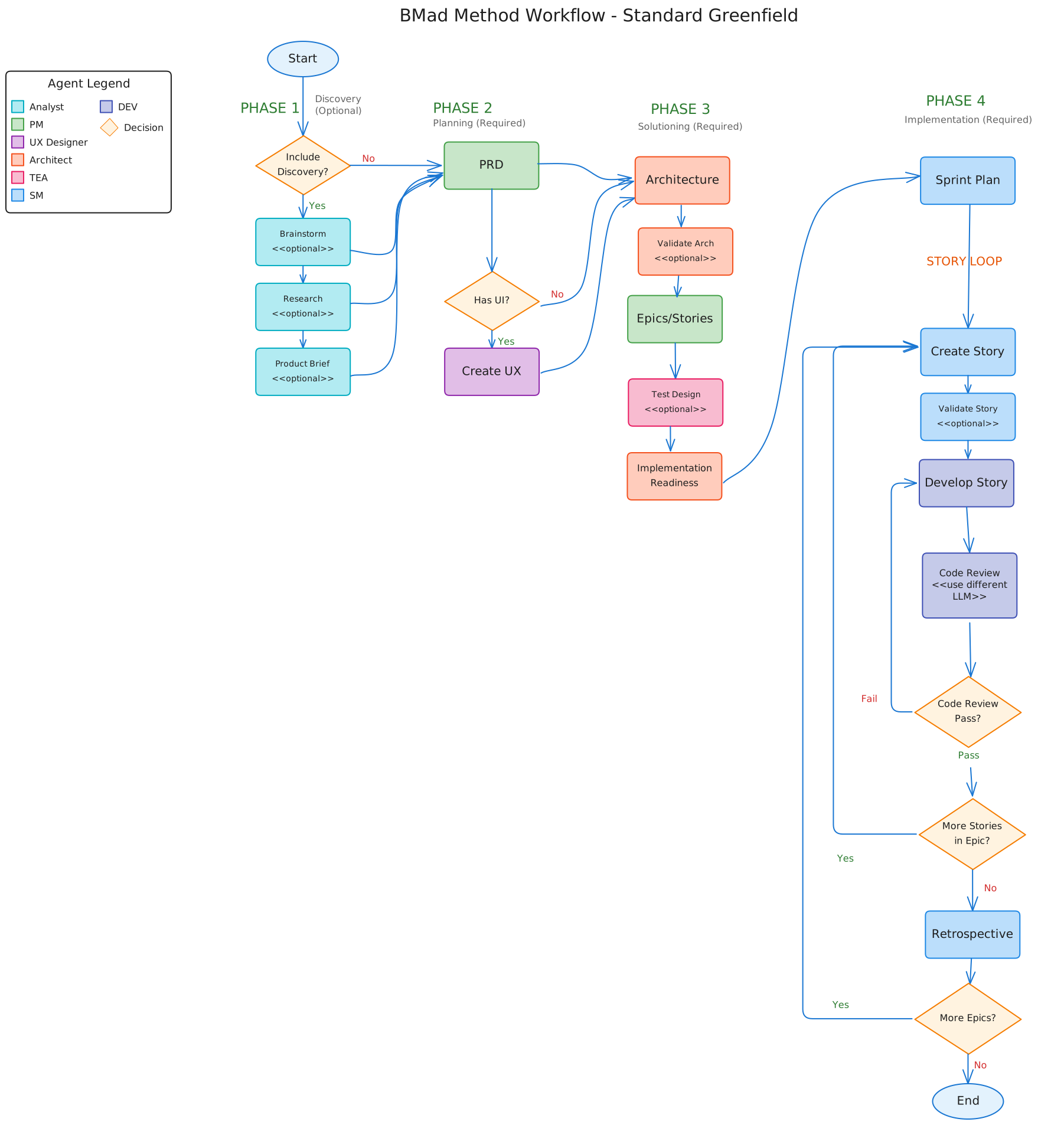
Complete visual flowchart showing all phases, workflows, and agents for the standard greenfield track.
Installation
npx bmad-method@alpha install
The interactive installer guides you through setup and creates a _bmad/ folder with all agents and workflows.
Step 1: Initialize Your Workflow
Load the Analyst agent in your IDE, wait for the menu, then tell it to run workflow-init.
:::info[How to Load Agents]
Type /<agent-name> in your IDE and use autocomplete. Not sure what's available? Start with /bmad to see all agents and workflows.
:::
During initialization, you'll describe your project, whether it's new or existing, and the general complexity. The workflow then recommends a planning track:
Quick Flow — Fast implementation with tech-spec only. Best for bug fixes, simple features, and clear scope (typically 1-15 stories).
BMad Method — Full planning with PRD, architecture, and optional UX design. Best for products, platforms, and complex features (typically 10-50+ stories).
Enterprise Method — Extended planning adding security, DevOps, and test planning. Best for compliance requirements and multi-tenant systems (typically 30+ stories).
:::note Story counts are guidance, not definitions. Choose your track based on planning needs, not story math. :::
Once you confirm, the workflow creates bmm-workflow-status.yaml to track your progress through all phases.
Step 2: Work Through Planning Phases
After initialization, work through phases 1-3. Use fresh chats for each workflow to avoid context limitations.
:::tip[Check Your Status]
Unsure what's next? Load any agent and ask for workflow-status. It tells you the next recommended or required workflow.
:::
Phase 1: Analysis (Optional)
All workflows in this phase are optional:
- brainstorm-project — Guided ideation
- research — Market and technical research
- product-brief — Recommended foundation document
Phase 2: Planning (Required)
For BMad Method and Enterprise tracks:
- Load the PM agent in a new chat
- Run the PRD workflow
- Output:
PRD.md
For Quick Flow track:
- Use
tech-specinstead of PRD, then skip to implementation
:::info[UX Design (Optional)] If your project has a user interface, load the UX-Designer agent and run the UX design workflow after creating your PRD. :::
Phase 3: Solutioning (BMad Method/Enterprise)
Create Architecture
- Load the Architect agent in a new chat
- Run
create-architecture - Output: Architecture document with technical decisions
Create Epics and Stories
:::tip[V6 Improvement] Epics and stories are now created after architecture. This produces better quality stories because architecture decisions (database, API patterns, tech stack) directly affect how work should be broken down. :::
- Load the PM agent in a new chat
- Run
create-epics-and-stories - The workflow uses both PRD and Architecture to create technically-informed stories
Implementation Readiness Check (Highly Recommended)
- Load the Architect agent in a new chat
- Run
implementation-readiness - Validates cohesion across all planning documents
Step 3: Build Your Project (Phase 4)
Once planning is complete, move to implementation. Each workflow should run in a fresh chat.
Initialize Sprint Planning
Load the SM agent and run sprint-planning. This creates sprint-status.yaml to track all epics and stories.
The Build Cycle
For each story, repeat this cycle with fresh chats:
| Step | Agent | Workflow | Purpose |
|---|---|---|---|
| 1 | SM | create-story |
Create story file from epic |
| 2 | DEV | dev-story |
Implement the story |
| 3 | TEA | automate |
Generate guardrail tests (optional) |
| 4 | DEV | code-review |
Quality validation (recommended) |
After completing all stories in an epic, load the SM agent and run retrospective.
:::warning[Why Fresh Chats?] Context-intensive workflows can cause hallucinations if you keep issuing commands in the same chat. Starting fresh ensures maximum context capacity. :::
Understanding the Agents
| Agent | Role |
|---|---|
| Analyst | Initializes workflows and tracks progress |
| PM | Creates requirements and specifications |
| UX-Designer | Designs interfaces and user experience |
| Architect | Designs system architecture |
| SM | Manages sprints and creates stories |
| DEV | Implements code and reviews work |
:::info[Working with Agents]
- Load an agent in your IDE
- Wait for the menu to appear
- Tell it what to run (natural language, menu number, or
*shortcut) - Follow the prompts :::
Project Tracking Files
BMad creates two files to track your progress:
bmm-workflow-status.yaml — Shows which phase you're in and what's next. Created by workflow-init, updated automatically as you progress.
sprint-status.yaml — Tracks all epics and stories during implementation. Created by sprint-planning, critical for SM and DEV agents to know what to work on.
You don't need to edit these manually—agents update them as you work.
Quick Reference
Agent → Document Mapping
| Agent | Creates |
|---|---|
| Analyst | Brainstorming notes, Product Brief |
| PM | PRD (Method/Enterprise) or tech-spec (Quick Flow), Epics & Stories |
| UX-Designer | UX Design Document |
| Architect | Architecture Document |
Workflow Commands
Run these by telling the agent naturally, using menu numbers, or typing *shortcut:
workflow-init— Start a new projectworkflow-status— Check what's nextprd— Create Product Requirements Documentcreate-architecture— Create architecturecreate-epics-and-stories— Break down PRD into epicssprint-planning— Initialize sprint trackingcreate-story— Create a story filedev-story— Implement a storycode-review— Review implemented code
Common Questions
Do I always need architecture? Only for BMad Method and Enterprise tracks. Quick Flow skips from tech-spec to implementation.
Can I change my plan later?
Yes. The SM agent has a correct-course workflow for handling scope changes.
What if I want to brainstorm first?
Load the Analyst agent and run brainstorm-project before workflow-init.
Can I skip workflow-init and workflow-status? Yes, once you learn the flow. Use the Quick Reference to go directly to needed workflows.
Getting Help
- During workflows — Agents guide you with questions and explanations
- Community — Discord (#general-dev, #bugs-issues)
- Documentation — BMM Workflow Reference
- Video tutorials — BMad Code YouTube
Key Takeaways
:::tip[Remember These]
- Always use fresh chats — Load agents in new chats for each workflow
- Let workflow-status guide you — Ask any agent for status when unsure
- Track matters — Quick Flow uses tech-spec; Method/Enterprise need PRD and architecture
- Tracking is automatic — Status files update themselves
- Agents are flexible — Use menu numbers, shortcuts, or natural language :::
Ready to start? Install BMad, load the Analyst, run workflow-init, and let the agents guide you.