6.0 KiB
BMGD Quick Start Guide
Get started building games with the BMad Game Development Module.
Prerequisites
Before starting with BMGD, ensure you have:
- BMAD-METHOD installed - Follow the main installation guide
- A game idea - Even a rough concept is enough to start
- Your preferred AI tool - Claude Code, Cursor, or web-based chat
Installation
BMGD is a custom module that extends BMM. Install it using the BMAD installer:
# During installation, select BMGD when prompted for custom modules
npx bmad-cli install
Or add to an existing installation:
npx bmad-cli install --add-module bmgd
Understanding the Phases
BMGD follows four game development phases:
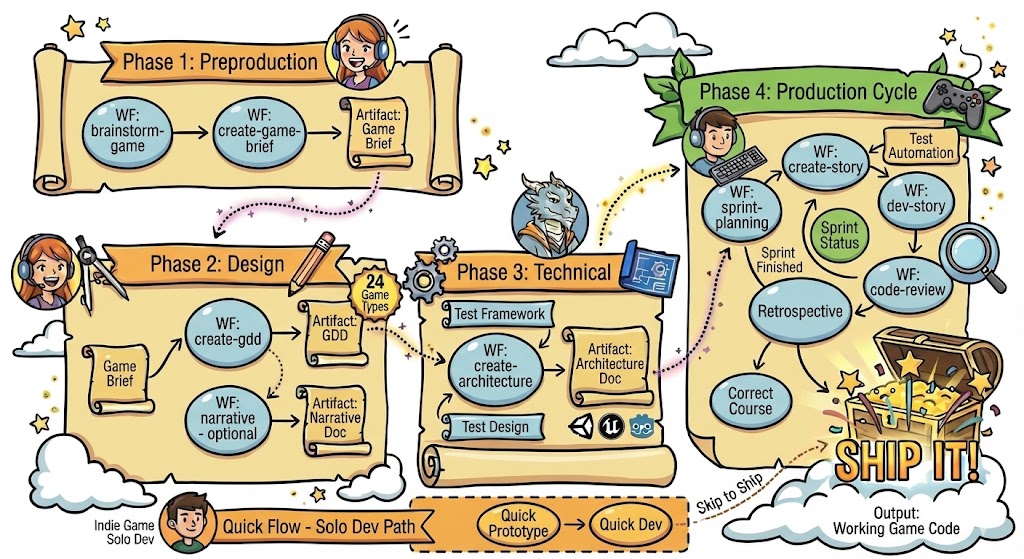
Phase 1: Preproduction
What happens: Capture your game vision and core concept.
Workflows:
brainstorm-game- Guided ideation with game-specific techniquescreate-game-brief- Document vision, market, pillars, and fundamentals
Output: Game Brief document
Phase 2: Design
What happens: Detail your game's mechanics, systems, and (optionally) narrative.
Workflows:
create-gdd- Create comprehensive Game Design Documentnarrative- Create Narrative Design Document (for story-driven games)
Output: GDD (and Narrative Design document if applicable)
Phase 3: Technical
What happens: Plan how you'll build the game.
Workflows:
create-architecture- Define engine, systems, patterns, and structure
Output: Game Architecture document
Phase 4: Production
What happens: Build your game in sprints.
Workflows:
sprint-planning- Plan and track sprintscreate-story-draft- Create implementable storiesdev-story- Implement storiescode-review- Quality assurancestory-done- Complete storiesepic-retrospective- Learn and improve
Output: Working game code
Your First Game Project
Step 1: Start with Brainstorming (Optional)
If you have a vague idea and want help developing it:
You: brainstorm-game
Agent: [Guides you through game-specific ideation techniques]
Step 2: Create Your Game Brief
Capture your game's core vision:
You: create-game-brief
Agent: [Walks you through game concept, pillars, market, and fundamentals]
Output: {output_folder}/game-brief.md
Step 3: Create Your GDD
Detail your game's design:
You: create-gdd
Agent: [Guides you through mechanics, systems, and game-type-specific sections]
Output: {output_folder}/gdd.md (or sharded into {output_folder}/gdd/)
Step 4: Add Narrative Design (If Story-Driven)
For games with significant story:
You: narrative
Agent: [Facilitates story, characters, world, and dialogue design]
Output: {output_folder}/narrative-design.md
Step 5: Create Architecture
Plan your technical implementation:
You: create-architecture
Agent: [Guides engine selection, system design, and technical decisions]
Output: {output_folder}/game-architecture.md
Step 6: Start Building
Begin sprint-based development:
You: sprint-planning
Agent: [Sets up sprint tracking and epic management]
Choosing Your Agent
BMGD provides four specialized agents:
| Agent | Icon | When to Use |
|---|---|---|
| Game Designer | 🎲 | Brainstorming, Game Brief, GDD, Narrative |
| Game Architect | 🏛️ | Architecture, technical decisions |
| Game Developer | 🕹️ | Implementation, code reviews |
| Game Scrum Master | 🎯 | Sprint planning, story management |
Typical Flow
- Game Designer (Phases 1-2): Brainstorm → Brief → GDD → Narrative
- Game Architect (Phase 3): Architecture
- Game Scrum Master (Phase 4): Sprint planning, story creation
- Game Developer (Phase 4): Implementation, code reviews
Quick Command Reference
Phase 1: Preproduction
brainstorm-game- Ideation sessioncreate-game-brief- Create Game Brief
Phase 2: Design
create-gdd- Create GDDnarrative- Create Narrative Design
Phase 3: Technical
create-architecture- Create Architecture
Phase 4: Production
sprint-planning- Plan sprintsepic-tech-context- Create Epic Tech Speccreate-story- Create storystory-context- Generate story contextdev-story- Implement storycode-review- Review codestory-done- Complete storyepic-retrospective- Team retrospective
Quick-Flow (Fast-Track)
quick-prototype- Rapid prototyping (IDE only)quick-dev- Flexible development (IDE only)
Utility
workflow-status- Check project statusparty-mode- Multi-agent collaborationadvanced-elicitation- Deep exploration
Tips for Success
1. Start Small
Begin with a simple game concept. You can always expand later.
2. Use Game Type Templates
When creating your GDD, BMGD offers 24 game type templates that provide genre-specific sections.
3. Iterate
Documents are living artifacts. Return to update them as your vision evolves.
4. Trust the Process
Each workflow builds on previous outputs. The Game Brief informs the GDD, which informs the Architecture, which informs implementation.
5. Collaborate with Agents
Use party-mode to get perspectives from multiple agents when facing complex decisions.
Next Steps
- Agents Guide - Learn about each agent's capabilities
- Workflows Guide - Detailed workflow reference
- Quick-Flow Guide - Rapid prototyping and development
- Game Types Guide - Understand game type templates
- Glossary - Game development terminology
Ready to start? Chat with the Game Designer agent and say brainstorm-game or create-game-brief!