6.1 KiB
BMGD Documentation
Complete guides for the BMad Game Development Module (BMGD) - AI-powered workflows for game design and development that adapt to your project's needs.
Getting Started
New to BMGD? Start here:
- Quick Start Guide - Get started building your first game
- Installation and setup
- Understanding the game development phases
- Running your first workflows
- Agent-based development flow
Quick Path: Install BMGD module → Game Brief → GDD → Architecture → Build
Core Concepts
Understanding how BMGD works:
-
Agents Guide - Complete reference for game development agents
- Game Designer, Game Developer, Game Architect, Game Scrum Master, Game QA, Game Solo Dev
- Agent roles and when to use them
- Agent workflows and menus
-
Workflows Guide - Complete workflow reference
- Phase 1: Preproduction (Brainstorm, Game Brief)
- Phase 2: Design (GDD, Narrative)
- Phase 3: Technical (Architecture)
- Phase 4: Production (Sprint-based development)
-
Game Types Guide - Selecting and using game type templates
- 24 supported game types
- Genre-specific GDD sections
- Hybrid game type handling
-
Quick-Flow Guide - Fast-track workflows for rapid development
- Quick-Prototype for testing ideas
- Quick-Dev for flexible implementation
- When to use quick-flow vs full BMGD
Quick References
Essential reference materials:
- Glossary - Key game development terminology
- Troubleshooting - Common issues and solutions
Choose Your Path
I need to...
Start a new game project
→ Start with Quick Start Guide
→ Run brainstorm-game for ideation
→ Create a Game Brief with create-brief
Design my game
→ Create a GDD with create-gdd
→ If story-heavy, add Narrative Design with create-narrative
Plan the technical architecture
→ Run create-architecture with the Game Architect
Build my game → Use Phase 4 production workflows → Follow the sprint-based development cycle
Quickly test an idea or implement a feature
→ Use Quick-Flow for rapid prototyping and development
→ quick-prototype to test mechanics, quick-dev to implement
Set up testing and QA
→ Use Game QA agent for test framework setup
→ Run test-framework to initialize testing for Unity/Unreal/Godot
→ Use test-design to create test scenarios
→ Plan playtests with playtest-plan
Understand game type templates → See Game Types Guide
Game Development Phases
BMGD follows four phases aligned with game development:
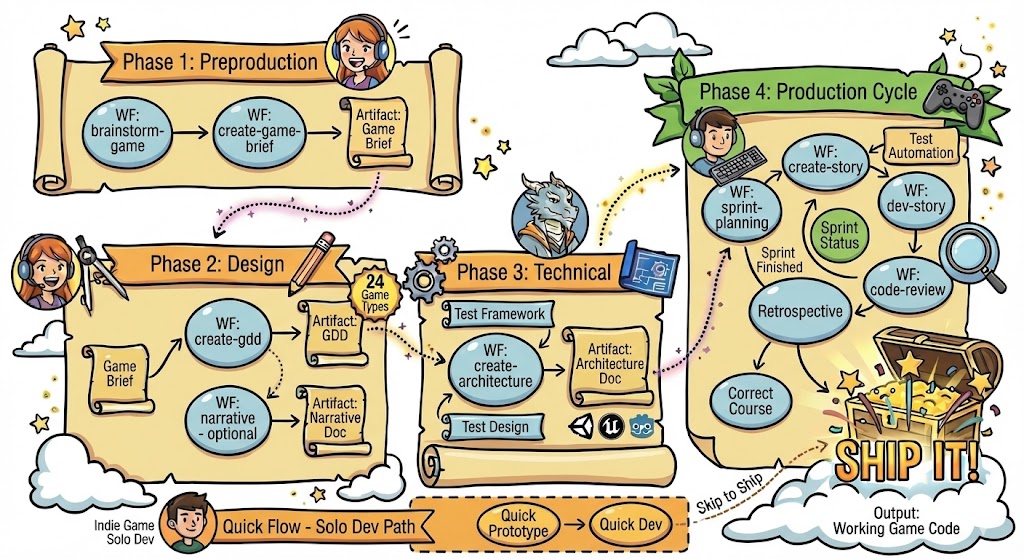
Phase 1: Preproduction
- Brainstorm Game - Ideation with game-specific techniques
- Game Brief - Capture vision, market, and fundamentals
Phase 2: Design
- GDD (Game Design Document) - Comprehensive game design
- Narrative Design - Story, characters, world (for story-driven games)
Phase 3: Technical
- Game Architecture - Engine, systems, patterns, structure
Phase 4: Production
- Sprint Planning - Epic and story management
- Story Development - Implementation workflow
- Code Review - Quality assurance
- Testing - Automated tests, playtesting, performance
- Retrospective - Continuous improvement
BMGD vs BMM
BMGD extends BMM with game-specific capabilities:
| Aspect | BMM | BMGD |
|---|---|---|
| Focus | General software | Game development |
| Agents | PM, Architect, Dev, SM, TEA, Solo Dev | Game Designer, Game Dev, Game Architect, Game SM, Game QA, Game Solo Dev |
| Planning | PRD, Tech Spec | Game Brief, GDD |
| Types | N/A | 24 game type templates |
| Narrative | N/A | Full narrative workflow |
| Testing | Web-focused testarch | Engine-specific (Unity, Unreal, Godot) |
| Production | Inherited from BMM | BMM workflows with game overrides |
BMGD production workflows inherit from BMM and add game-specific checklists and templates.
Documentation Map
BMGD Documentation
├── README.md (this file)
├── quick-start.md          # Getting started
├── agents-guide.md         # Agent reference
├── workflows-guide.md      # Workflow reference
├── quick-flow-guide.md     # Rapid prototyping and development
├── game-types-guide.md     # Game type templates
├── glossary.md             # Terminology
└── troubleshooting.md      # Common issues
External Resources
Community and Support
- Discord Community - Get help from the community
- GitHub Issues - Report bugs or request features
- YouTube Channel - Video tutorials
Related Documentation
- BMM Documentation - Core BMad Method documentation
- IDE Setup Guides - Configure your development environment
Tips for Using This Documentation
- Start with Quick Start if you're new to BMGD
- Check Game Types Guide when creating your GDD
- Reference Glossary for game development terminology
- Use Troubleshooting when you encounter issues
Ready to make games? → Start with the Quick Start Guide