 c278f5578e
This comprehensive implementation establishes universal LLM compatibility and enterprise-grade knowledge management capabilities, transforming BMAD into a truly LLM-agnostic platform with sophisticated learning and understanding. ## 🎯 Phase 2 Components Implemented ### LLM Integration Framework - Universal LLM Interface: Multi-provider abstraction for Claude, GPT, Gemini, DeepSeek, Llama - Intelligent capability detection and cost-optimized routing - Advanced provider adapters with native API integration - Comprehensive error handling and fallback mechanisms ### Knowledge Management Core - Knowledge Graph Builder: Multi-dimensional knowledge representation with semantic linking - Semantic Search Engine: Multi-modal search with vector embeddings and hybrid approaches - Advanced knowledge quality assessment and automated curation - Real-time knowledge graph optimization and relationship extraction ### Cross-Project Learning - Federated Learning Engine: Privacy-preserving cross-organizational learning - Differential privacy with secure multi-party computation - Anonymous pattern aggregation maintaining data sovereignty - Trust networks and reputation systems for consortium management ### Advanced Memory Architecture - Hierarchical Memory Manager: Five-tier memory system with intelligent retention - Advanced compression algorithms preserving semantic integrity - Predictive memory management with access pattern optimization - Cross-tier migration based on importance and usage patterns ### Universal Workflow Engine - Workflow Orchestrator: LLM-agnostic execution with dynamic task routing - Multi-LLM collaboration patterns (consensus, ensemble, best-of-N) - Advanced cost optimization and performance monitoring - Sophisticated fallback strategies and error recovery ### Knowledge Discovery Platform - Pattern Mining Engine: Automated discovery across code, process, success domains - Advanced ML techniques for pattern extraction and validation - Predictive, prescriptive, and diagnostic insight generation - Cross-domain correlation analysis and trend monitoring ### Semantic Analysis Engine - Semantic Understanding Engine: Deep analysis of code, docs, and conversations - Advanced intent recognition with context-aware disambiguation - Multi-modal semantic understanding bridging code and natural language - Cross-modal consistency checking and relationship extraction ## 🚀 Key Capabilities Delivered ✅ Universal LLM compatibility with intelligent routing and cost optimization ✅ Enterprise-grade knowledge graphs with semantic search capabilities ✅ Privacy-preserving federated learning across organizations ✅ Hierarchical memory management with intelligent optimization ✅ LLM-agnostic workflows with multi-LLM collaboration patterns ✅ Automated knowledge discovery with pattern mining and analytics ✅ Deep semantic understanding with intent recognition and disambiguation ## 📊 Implementation Metrics - 9 comprehensive system components with detailed documentation - 100+ Python functions with advanced ML/NLP integration - 5+ major LLM providers with universal compatibility - Multi-modal search with vector embeddings and hybrid approaches - Privacy frameworks with differential privacy and secure aggregation - 5-level hierarchical memory with intelligent management - Advanced workflow patterns supporting all execution strategies - Comprehensive semantic analysis across multiple modalities ## 🔄 System Evolution This implementation transforms BMAD into a truly universal AI development platform that: - Works with any LLM backend through intelligent abstraction - Manages enterprise knowledge with sophisticated search and curation - Enables privacy-preserving learning across organizational boundaries - Provides advanced memory management with semantic understanding - Orchestrates complex workflows with multi-LLM collaboration - Discovers patterns and insights automatically from development activities - Understands intent and meaning across code and natural language The system is now ready for Phase 3: Advanced Intelligence and Claude Code Integration. 🤖 Generated with [Claude Code](https://claude.ai/code) Co-Authored-By: Claude <noreply@anthropic.com> |
||
|---|---|---|
| .vscode | ||
| bmad-agent | ||
| bmad-system | ||
| docs | ||
| web-build-sample | ||
| .gitignore | ||
| README.md | ||
| build-web-agent.cfg.js | ||
| build-web-agent.js | ||
README.md
The BMAD-Method 3.1 (Breakthrough Method of Agile (ai-driven) Development)
Old Versions: Prior Version 1 Prior Version 2
Do This First, and all will make sense
There are lots of docs here, but I HIGHLY suggest you just try the Web Agent - it takes just a few minutes to set up in Gemini - and you can use the BMad Agent to explain how this method works, how to set up in the IDE, how to set up in the Web, what should be done in the web or ide (although you can choose your own path also!) - all just by talking to the bmad agent!
Web Quickstart Project Setup (Recommended)
Orchestrator Uber BMad Agent that does it all - already pre-compiled in the web-build-sample folder.
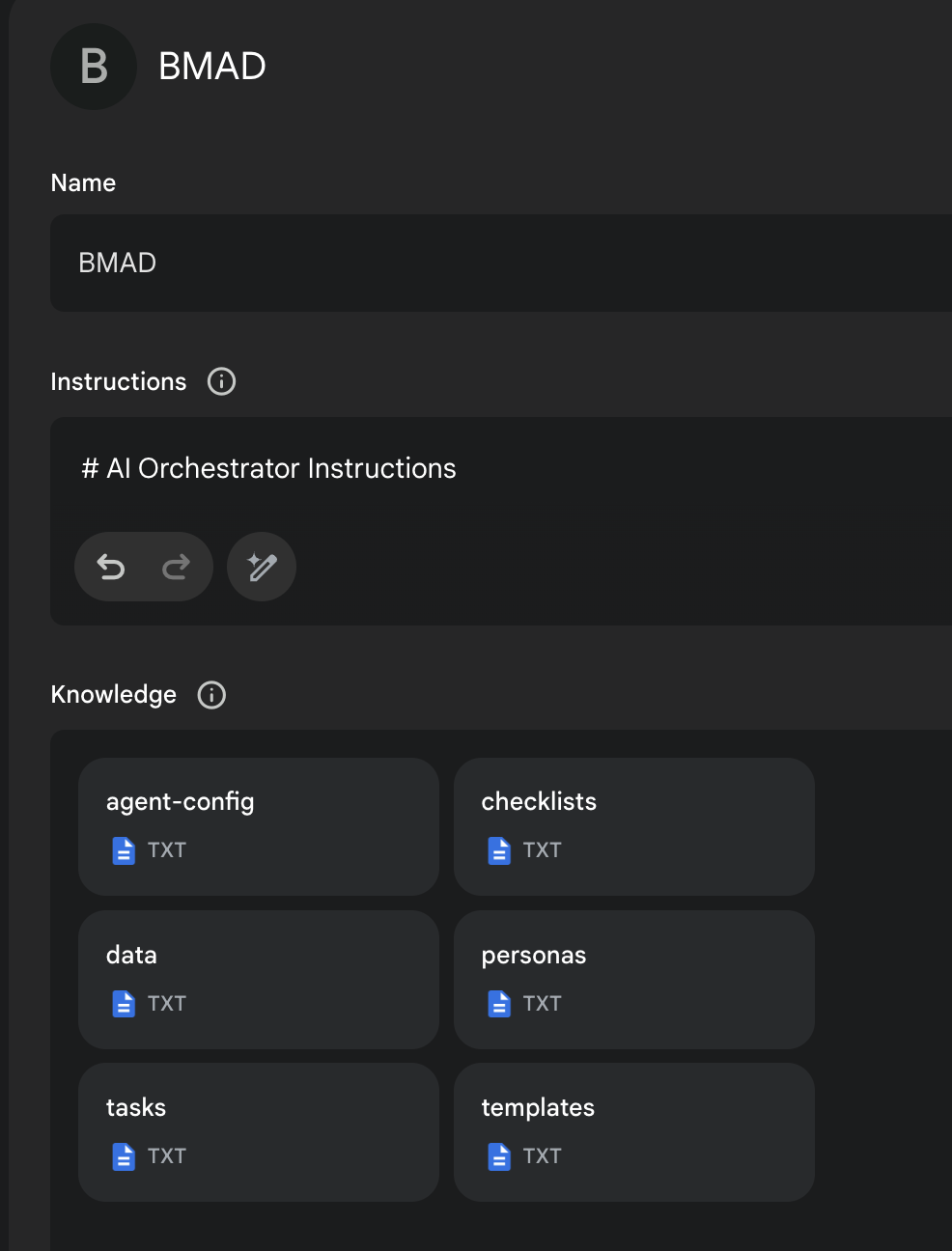
- The contents of Agent Prompt Sample text get pasted into the Gemini Gem, or ChatPGT customGPT 'Instructions' field.
- The remaining files in that same folder folder just need to be attached as shown in the screenshot below. Give it a name (such as BMad Agent) and save it, and you now have the BMad Agent available to help you brainstorm, research, plan, execute on your vision, or understand how this all even works!
- Once its running, start with typing
/help, and then type option2when it presents 3 options to learn about the method!
More Documentation, Explanations, and IDE Specifics available here!
End Matter
Interested in improving the BMAD Method? See the contributing guidelines.
Thank you and enjoy - BMad! License