 b88845c0fe
The ternary operators were checking `Array.isArray()` but returning the same value in both branches, making them completely pointless. Since profiles can contain both arrays (e.g., `['dev', 'architect']`) and strings (e.g., `'all'`), and both are valid, we should just assign the value directly. Fixed lines: - normalized.modules = profile.modules - normalized.agents = profile.agents - normalized.workflows = profile.workflows 🤖 Generated with [Claude Code](https://claude.com/claude-code) Co-Authored-By: Claude <noreply@anthropic.com> |
||
|---|---|---|
| .github | ||
| .husky | ||
| .vscode | ||
| docs | ||
| src | ||
| test | ||
| tools | ||
| .coderabbit.yaml | ||
| .gitignore | ||
| .markdownlint-cli2.yaml | ||
| .npmrc | ||
| .nvmrc | ||
| .prettierignore | ||
| CHANGELOG.md | ||
| CONTRIBUTING.md | ||
| LICENSE | ||
| README.md | ||
| eslint.config.mjs | ||
| package-lock.json | ||
| package.json | ||
| prettier.config.mjs | ||
README.md
BMad Method & BMad Core





🎉 NEW: BMAD V6 Installer - Create & Share Custom Content!
The completely revamped BMAD V6 installer now includes built-in support for creating, installing, and sharing custom modules, agents, workflows, templates, and tools! Build your own AI solutions or share them with your team - and real soon, with the whole BMad Community througha verified community sharing portal!
✨ What's New:
- 📦 Streamlined Custom Module Installation - Package your custom content as installable modules
- 🤖 Agent & Workflow Sharing - Distribute standalone agents and workflows
- 🔄 Unitary Module Support - Install individual components without full modules
- ⚙️ Dependency Management - Automatic handling of module dependencies
- 🛡️ Update-Safe Customization - Your custom content persists through updates
📚 Learn More:
- Custom Content Overview - Discover all supported content types
- Installation Guide - Learn to create and install custom content
- Detail Content Docs - Reference details for agents, modules, workflows and the bmad builder
- 2 Very simple Custom Modules of questionable quality - if you want to download and try to install a custom shared module, get an idea of how to bundle and share your own, or create your own personal agents, workflows and modules.
AI-Driven Agile Development That Scales From Bug Fixes to Enterprise
Build More, Architect Dreams (BMAD) with 21 specialized AI agents across 4 official modules, and 50+ guided workflows that adapt to your project's complexity—from quick bug fixes to enterprise platforms, and new step file workflows that allow for incredibly long workflows to stay on the rails longer than ever before!
Additionally - when we say 'Build More, Architect Dreams' - we mean it! The BMad Builder has landed, and now as of Alpha.15 is fully supported in the installation flow via NPX - custom stand along agents, workflows and the modules of your dreams! The community forge will soon open, endless possibility awaits!
🚀 v6 is a MASSIVE upgrade from v4! Complete architectural overhaul, scale-adaptive intelligence, visual workflows, and the powerful BMad Core framework. v4 users: this changes everything. See what's new →
📌 v6 Alpha Status: Near-beta quality with vastly improved stability. Documentation is being finalized. New videos coming soon to BMadCode YouTube.
🎯 Why BMad Method?
Unlike generic AI coding assistants, BMad Method provides structured, battle-tested workflows powered by specialized agents who understand agile development. Each agent has deep domain expertise—from product management to architecture to testing—working together seamlessly.
✨ Key Benefits:
- Scale-Adaptive Intelligence - Automatically adjusts planning depth from bug fixes to enterprise systems
- Complete Development Lifecycle - Analysis → Planning → Architecture → Implementation
- Specialized Expertise - 19 agents with specific roles (PM, Architect, Developer, UX Designer, etc.)
- Proven Methodologies - Built on agile best practices with AI amplification
- IDE Integration - Works with Claude Code, Cursor, Windsurf, VS Code
🏗️ The Power of BMad Core
BMad Method is actually a sophisticated module built on top of BMad Core (Collaboration Optimized Reflection Engine). This revolutionary architecture means:
- BMad Core provides the universal framework for human-AI collaboration
- BMad Method leverages Core to deliver agile development workflows
- BMad Builder lets YOU create custom modules as powerful as BMad Method itself
With BMad Builder, you can architect both simple agents and vastly complex domain-specific modules (legal, medical, finance, education, creative) that will soon be sharable in an official community marketplace. Imagine building and sharing your own specialized AI team!
📊 See It In Action
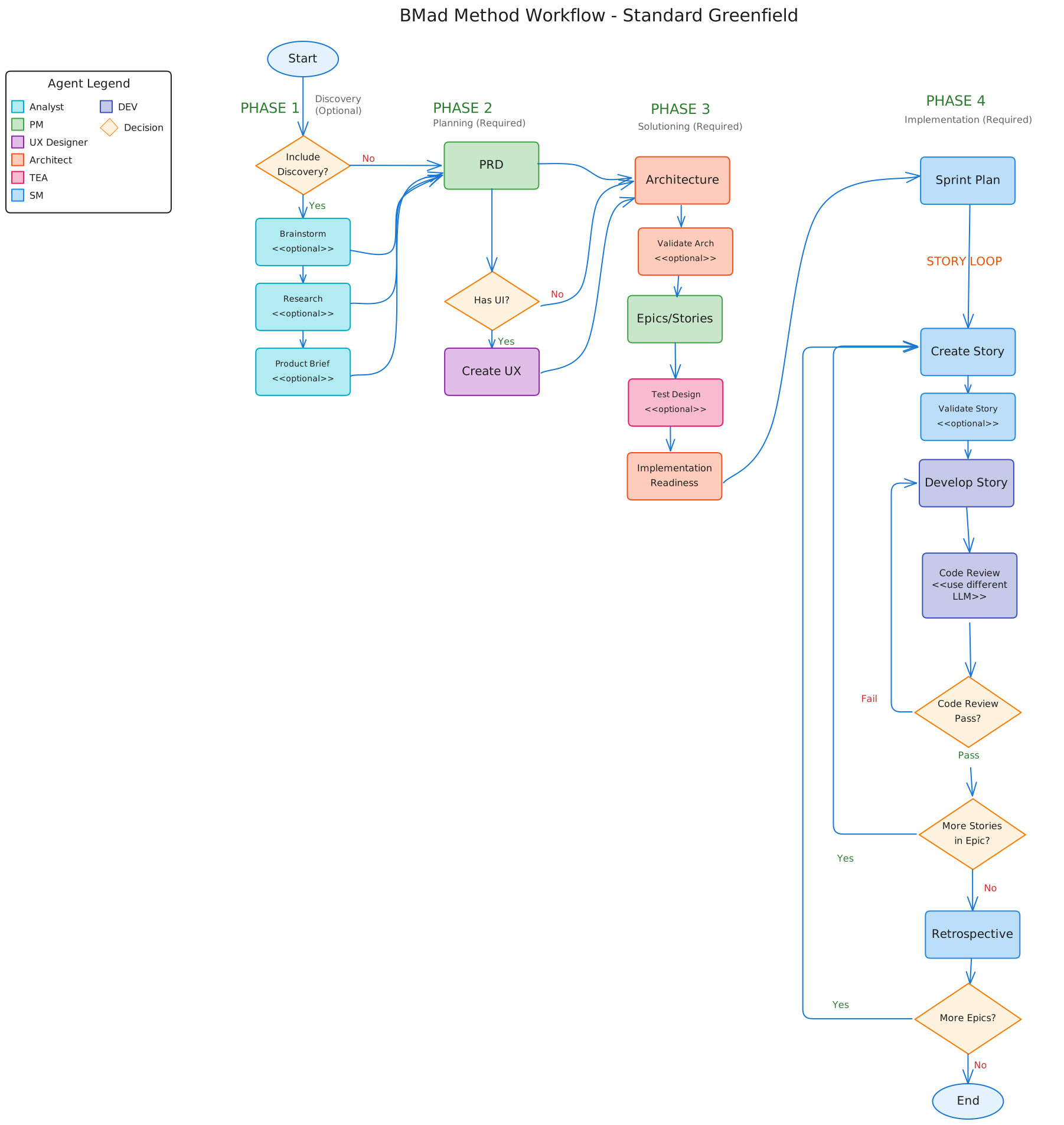
Complete BMad Method workflow showing all phases, agents, and decision points
🚀 Get Started in 3 Steps
1. Install BMad Method
Interactive Installation (Default)
# Install v6 Alpha (recommended)
npx bmad-method@alpha install

# Or stable v4 for production
npx bmad-method install
Non-Interactive Installation (CI/CD, Automation)
For automated deployments and CI/CD pipelines:
# Minimal installation with defaults
npx bmad-method@alpha install -y

# Custom configuration
npx bmad-method@alpha install -y \
  --user-name=Alice \
  --skill-level=advanced \
  --output-folder=.bmad-output

# Team-based installation (fullstack team)
npx bmad-method@alpha install -y --team=fullstack

# Team with modifications
npx bmad-method@alpha install -y --team=fullstack --agents=+dev

# Selective agents and workflows
npx bmad-method@alpha install -y \
  --agents=dev,architect,pm \
  --workflows=create-prd,create-tech-spec,dev-story

# Profile-based installation
npx bmad-method@alpha install -y --profile=minimal
npx bmad-method@alpha install -y --profile=solo-dev
Available Options:
-y, --non-interactive- Skip all prompts, use defaults--user-name <name>- User name for configuration--skill-level <level>- beginner, intermediate, advanced--output-folder <path>- Output folder for BMAD artifacts--modules <list>- Comma-separated module list--agents <list>- Comma-separated agent list or 'all', 'none'--workflows <list>- Comma-separated workflow list or 'all', 'none'--team <name>- Install predefined team (fullstack, gamedev)--profile <name>- Installation profile (minimal, full, solo-dev, team)
Modifiers:
--agents=+dev- Add agent to team/profile selection--agents=-dev- Remove agent from team/profile selection
Available Teams:
fullstack- analyst, architect, pm, sm, ux-designergamedev- game-designer, game-dev, game-architect, game-scrum-master
Available Profiles:
minimal- Core + dev agent + essential workflowsfull- Everything (all modules, agents, workflows)solo-dev- Single developer setupteam- Team collaboration setup
2. Initialize Your Project
Load any agent in your IDE and run:
*workflow-init
This analyzes your project and recommends the right workflow track.
3. Choose Your Track
BMad Method adapts to your needs with three intelligent tracks:
| Track | Use For | Planning | Time to Start |
|---|---|---|---|
| ⚡ Quick Flow | Bug fixes, small features | Tech spec only | < 5 minutes |
| 📋 BMad Method | Products, platforms | PRD + Architecture + UX | < 15 minutes |
| 🏢 Enterprise | Compliance, scale | Full governance suite | < 30 minutes |
Not sure? Run
*workflow-initand let BMad analyze your project goal.
🔄 How It Works: 4-Phase Methodology
BMad Method guides you through a proven development lifecycle:
- 📊 Analysis (Optional) - Brainstorm, research, and explore solutions
- 📝 Planning - Create PRDs, tech specs, or game design documents
- 🏗️ Solutioning - Design architecture, UX, and technical approach
- ⚡ Implementation - Story-driven development with continuous validation
Each phase has specialized workflows and agents working together to deliver exceptional results.
🤖 Meet Your Team
12 Specialized Agents working in concert:
| Development | Architecture | Product | Leadership |
|---|---|---|---|
| Developer | Architect | PM | Scrum Master |
| UX Designer | Test Architect | Analyst | BMad Master |
| Tech Writer | Game Architect | Game Designer | Game Developer |
Test Architect integrates with @seontechnologies/playwright-utils for production-ready fixture-based utilities.
Each agent brings deep expertise and can be customized to match your team's style.
📦 What's Included
Core Modules
-
BMad Method (BMM) - Complete agile development framework
- 12 specialized agents
- 34 workflows across 4 phases
- Scale-adaptive planning
- → Documentation Hub
-
BMad Builder (BMB) - Create custom agents and workflows
- Build anything from simple agents to complex modules
- Create domain-specific solutions (legal, medical, finance, education)
- → Builder Guide marketplace
- → Builder Guide
-
Creative Intelligence Suite (CIS) - Innovation & problem-solving
- Brainstorming, design thinking, storytelling
- 5 creative facilitation workflows
- → Creative Workflows
Key Features
- 🎨 Customizable Agents - Modify personalities, expertise, and communication styles
- 🌐 Multi-Language Support - Separate settings for communication and code output
- 📄 Document Sharding - 90% token savings for large projects
- 🔄 Update-Safe - Your customizations persist through updates
- 🚀 Web Bundles - Use in ChatGPT, Claude Projects, or Gemini Gems
📚 Documentation
Quick Links
- Quick Start Guide - 15-minute introduction
- Complete BMM Documentation - All guides and references
- Agent Customization - Personalize your agents
- All Documentation - Complete documentation index
For v4 Users
💬 Community & Support
- Discord Community - Get help, share projects
- GitHub Issues - Report bugs, request features
- YouTube Channel - Video tutorials and demos
- Web Bundles - Pre-built agent bundles
- Code of Conduct - Community guidelines
🛠️ Development
For contributors working on the BMad codebase:
# Run all quality checks
npm test

# Development commands
npm run lint:fix      # Fix code style
npm run format:fix    # Auto-format code
npm run bundle        # Build web bundles
See CONTRIBUTING.md for full development guidelines.
What's New in v6
v6 represents a complete architectural revolution from v4:
🚀 Major Upgrades
- BMad Core Framework - Modular architecture enabling custom domain solutions
- Scale-Adaptive Intelligence - Automatic adjustment from bug fixes to enterprise
- Visual Workflows - Beautiful SVG diagrams showing complete methodology
- BMad Builder Module - Create and share your own AI agent teams
- 50+ Workflows - Up from 20 in v4, covering every development scenario
- 19 Specialized Agents - Enhanced with customizable personalities and expertise
- Update-Safe Customization - Your configs persist through all updates
- Web Bundles - Use agents in ChatGPT, Claude, and Gemini
- Multi-Language Support - Separate settings for communication and code
- Document Sharding - 90% token savings for large projects
🔄 For v4 Users
- Comprehensive Upgrade Guide - Step-by-step migration
- v4 Documentation Archive - Legacy reference
- Backwards compatibility where possible
- Smooth migration path with installer detection
📄 License
MIT License - See LICENSE for details.
Trademarks: BMad™ and BMAD-METHOD™ are trademarks of BMad Code, LLC.
Supported by: 
Built with ❤️ for the human-AI collaboration community