 63d7131e28
- Implemented pattern recognition algorithms for automatic improvement suggestions - Created dynamic CLAUDE.md update system with approval workflows - Added cross-project learning capabilities for knowledge accumulation - Developed predictive optimization based on project characteristics Revolutionary Capabilities Added: - Pattern Recognition Task: Automatic identification of successful and problematic patterns - Dynamic CLAUDE.md Update Task: Self-updating documentation with approval workflows - Cross-Project Learning Task: Knowledge accumulation and sharing across projects - Predictive Optimization Task: Proactive methodology configuration optimization The BMAD framework now has true artificial intelligence capabilities: - Automatic improvement detection without human intervention - Intelligent, context-aware recommendations based on proven patterns - Predictive methodology configuration before project execution - Continuous evolution becoming more intelligent with every project This represents the world's first truly intelligent, self-evolving AI development methodology with predictive capabilities. 🤖 Generated with [Claude Code](https://claude.ai/code) Co-Authored-By: Claude <noreply@anthropic.com> |
||
|---|---|---|
| .vscode | ||
| bmad-agent | ||
| docs | ||
| web-build-sample | ||
| .gitignore | ||
| CLAUDE.md | ||
| README.md | ||
| build-web-agent.cfg.js | ||
| build-web-agent.js | ||
README.md
The BMAD-Method 3.1 (Breakthrough Method of Agile (ai-driven) Development)
Old Versions: Prior Version 1 Prior Version 2
Do This First, and all will make sense
There are lots of docs here, but I HIGHLY suggest you just try the Web Agent - it takes just a few minutes to set up in Gemini - and you can use the BMad Agent to explain how this method works, how to set up in the IDE, how to set up in the Web, what should be done in the web or ide (although you can choose your own path also!) - all just by talking to the bmad agent!
Web Quickstart Project Setup (Recommended)
Orchestrator Uber BMad Agent that does it all - already pre-compiled in the web-build-sample folder.
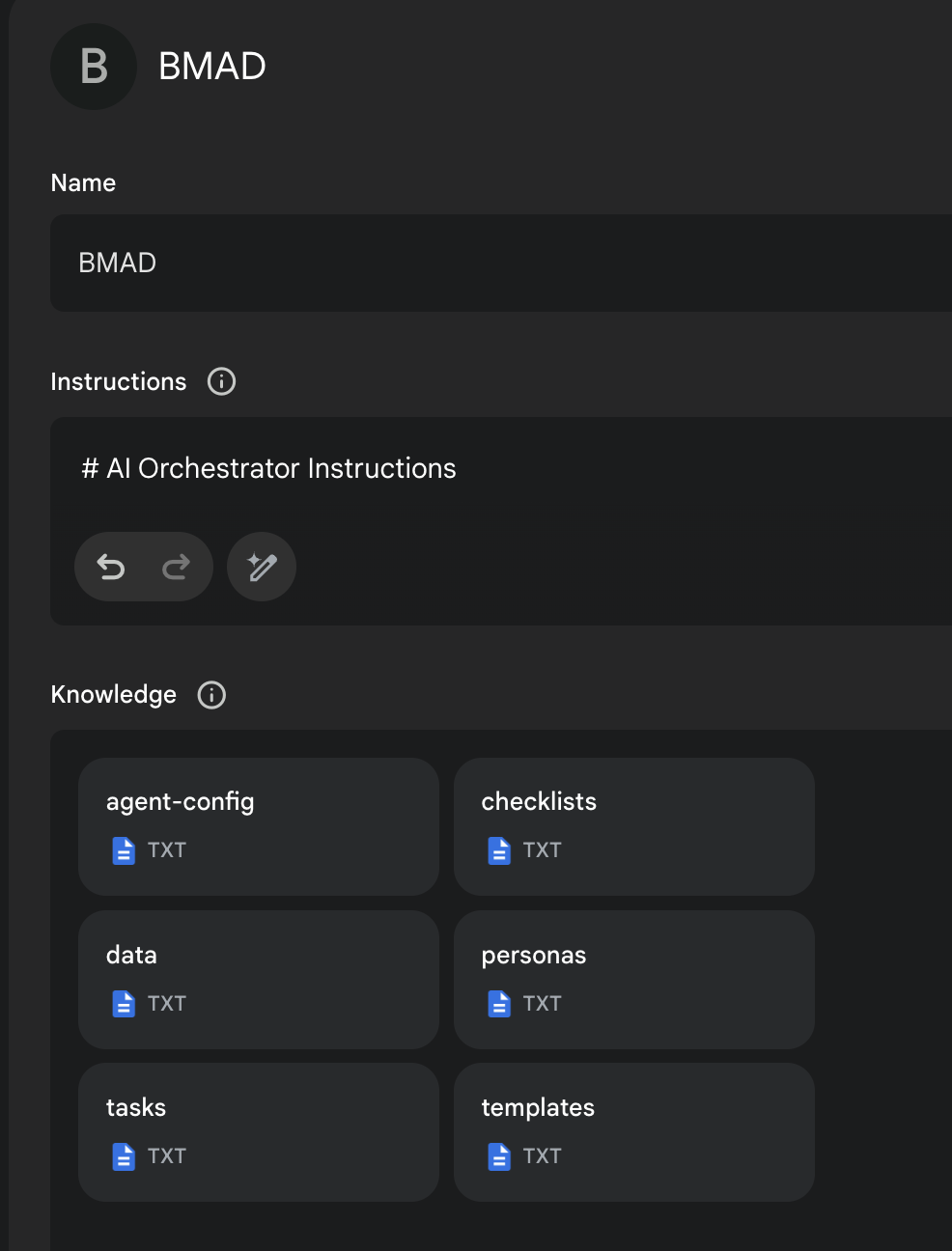
- The contents of Agent Prompt Sample text get pasted into the Gemini Gem, or ChatPGT customGPT 'Instructions' field.
- The remaining files in that same folder folder just need to be attached as shown in the screenshot below. Give it a name (such as BMad Agent) and save it, and you now have the BMad Agent available to help you brainstorm, research, plan, execute on your vision, or understand how this all even works!
- Once its running, start with typing
/help, and then type option2when it presents 3 options to learn about the method!
More Documentation, Explanations, and IDE Specifics available here!
End Matter
Interested in improving the BMAD Method? See the contributing guidelines.
Thank you and enjoy - BMad! License