 352e111b70
Add comprehensive Marketing Ops module converted from BMAD-FOR-MARKETING
repository with significant enhancements and BMAD v6 integration.

## Module Contents

### 4 Specialized Marketing Agents
- Sofia (Brand Marketing Strategist) - Brand strategy and positioning
- Marcus (Performance Marketing Specialist) - Campaign planning and optimization
- Elena (Marketing Data Analyst) - Analytics and insights
- Maya (Creative Marketing Designer) - Design briefs and creative production

### 13 Comprehensive Workflows
**Brand & Strategy:**
- brand-strategy - Complete brand positioning and messaging framework
- brand-analysis - Comprehensive brand audit and competitive assessment
- brand-launch - Multi-channel brand launch campaign planning
- content-calendar - Strategic content planning with themes

**Performance Marketing:**
- campaign-plan - Comprehensive paid campaign strategy
- campaign-optimize - Performance analysis and optimization
- budget-planning - Strategic budget allocation across channels

**Analytics & Insights:**
- analytics-report - Comprehensive performance reporting
- attribution-modeling - Multi-touch attribution analysis
- dashboard-setup - Performance dashboard configuration

**Creative & Design:**
- design-brief - Detailed creative project brief creation
- landing-page-design - Conversion-optimized landing page development
- email-design - Email marketing template creation

### 20 Specialized Tasks
- Brand: competitive-research, brand-audit, content-strategy, voice-tone-guide, brand-system
- Performance: audience-analysis, channel-strategy, bid-optimization, creative-testing, attribution-setup
- Analytics: data-analysis, funnel-analysis, roi-analysis, customer-segmentation, cohort-analysis, ab-test-analysis, predictive-analysis
- Creative: social-media-design, ad-creative, mobile-optimization

## Key Features

- Strategic planning frameworks (brand strategy, campaign planning)
- Performance optimization (ROAS maximization, budget allocation)
- Comprehensive analytics (attribution, cohort analysis, forecasting)
- Professional creative production (design briefs, platform-specific assets)
- Industry benchmarks and best practices
- Platform-specific tactics (Google Ads, Facebook, LinkedIn, TikTok, YouTube)
- Complete installation configuration with interactive prompts
- Marketing knowledge base with metrics and benchmarks

## Documentation Updates

- Updated main README: 27+ → 31+ agents, 60+ → 73+ workflows
- Updated CHANGELOG with comprehensive Marketing Ops entry
- Updated docs/index.md with Marketing Ops path and quick reference
- Created comprehensive module README with usage examples and guides

## Files Changed

- 53 new files in src/modules/marketing-ops/
- 3 documentation files updated (README, CHANGELOG, docs/index.md)
- Total: 56 files changed

## Conversion Details

Successfully converted BMAD-FOR-MARKETING repository to BMAD v6 module:
- Agents → BMAD v6 .agent.yaml format with metadata, persona, menu
- Tasks → XML format with comprehensive instructions
- Workflows → BMAD workflow.yaml + instructions.md + template.md structure
- Templates → Detailed markdown templates with variable placeholders
- Installation → install-config.yaml with interactive prompts and configuration

All components follow BMAD v6 conventions with proper path placeholders
({project-root}/{bmad_folder}/marketing-ops/).
|
||
|---|---|---|
| .github | ||
| .husky | ||
| .vscode | ||
| docs | ||
| src | ||
| test | ||
| tools | ||
| .gitignore | ||
| .npmrc | ||
| .nvmrc | ||
| .prettierignore | ||
| CHANGELOG.md | ||
| CONTRIBUTING.md | ||
| LICENSE | ||
| README.md | ||
| eslint.config.mjs | ||
| package-lock.json | ||
| package.json | ||
| prettier.config.mjs | ||
README.md
BMad Method & BMad Core





AI-Driven Agile Development That Scales From Bug Fixes to Enterprise
Build More, Architect Dreams (BMAD) with 31+ specialized AI agents and 73+ guided workflows that adapt to your project's complexity—from quick bug fixes to enterprise platforms to content creation and marketing operations.
🚀 v6 is a MASSIVE upgrade from v4! Complete architectural overhaul, scale-adaptive intelligence, visual workflows, and the powerful BMad Core framework. v4 users: this changes everything. See what's new →
📌 v6 Alpha Status: Near-beta quality with vastly improved stability. Documentation is being finalized. New videos coming soon to BMadCode YouTube.
🎯 Why BMad Method?
Unlike generic AI coding assistants, BMad Method provides structured, battle-tested workflows powered by specialized agents who understand agile development. Each agent has deep domain expertise—from product management to architecture to testing—working together seamlessly.
✨ Key Benefits:
- Scale-Adaptive Intelligence - Automatically adjusts planning depth from bug fixes to enterprise systems
- Complete Development Lifecycle - Analysis → Planning → Architecture → Implementation
- Specialized Expertise - 27+ agents with specific roles (PM, Architect, Developer, UX Designer, Content Creator, etc.)
- Proven Methodologies - Built on agile best practices with AI amplification
- Advanced Voice & Style System - AI content that authentically matches your unique writing style
- IDE Integration - Works with Claude Code, Cursor, Windsurf, VS Code
🏗️ The Power of BMad Core
BMad Method is actually a sophisticated module built on top of BMad Core (Collaboration Optimized Reflection Engine). This revolutionary architecture means:
- BMad Core provides the universal framework for human-AI collaboration
- BMad Method leverages Core to deliver agile development workflows
- BMad Builder lets YOU create custom modules as powerful as BMad Method itself
With BMad Builder, you can architect both simple agents and vastly complex domain-specific modules (legal, medical, finance, education, creative) that will soon be sharable in an official community marketplace. Imagine building and sharing your own specialized AI team!
📊 See It In Action
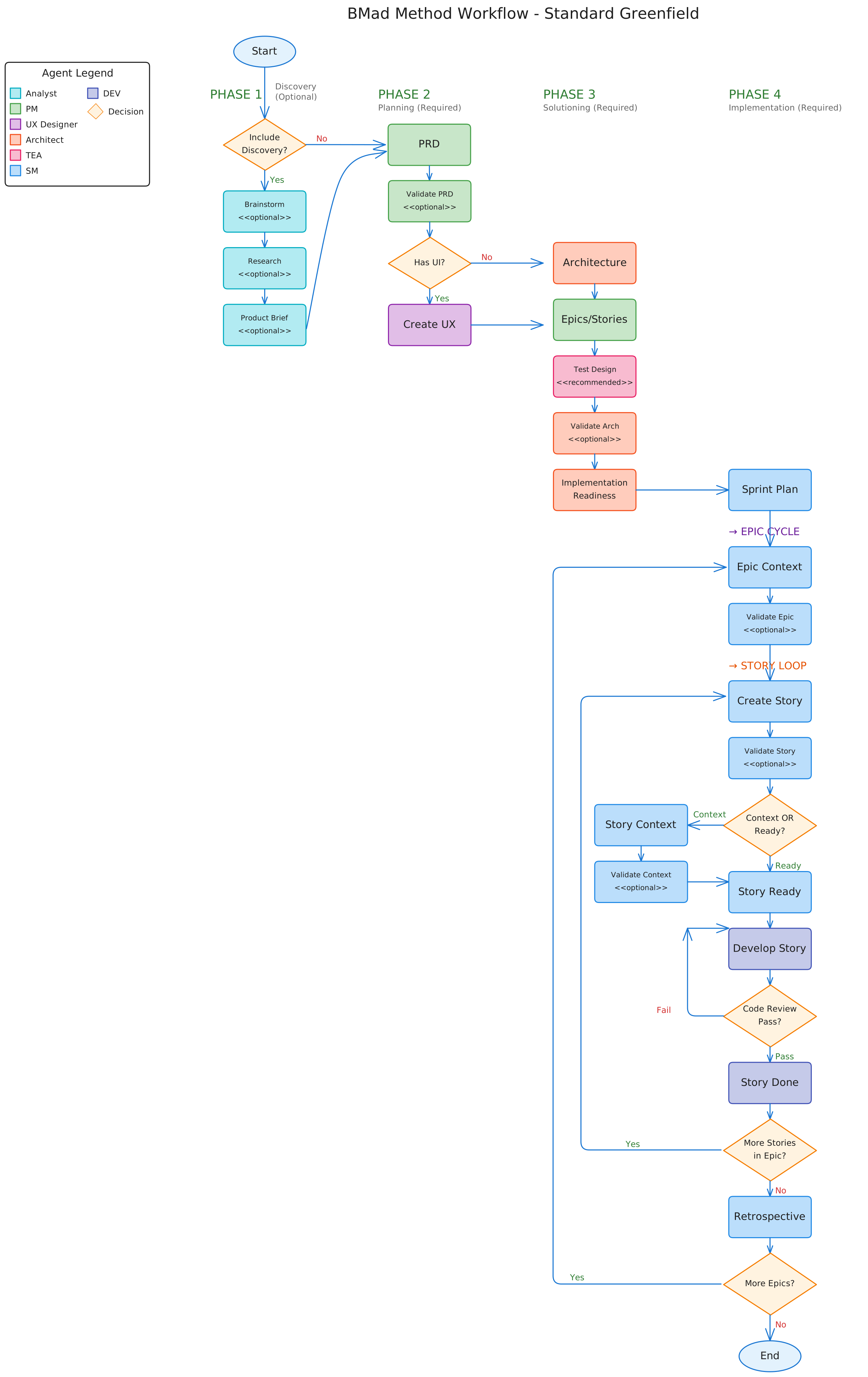
Complete BMad Method workflow showing all phases, agents, and decision points
🚀 Get Started in 3 Steps
1. Install BMad Method
# Install v6 Alpha (recommended)
npx bmad-method@alpha install

# Or stable v4 for production
npx bmad-method install
2. Initialize Your Project
Load any agent in your IDE and run:
*workflow-init
This analyzes your project and recommends the right workflow track.
3. Choose Your Track
BMad Method adapts to your needs with three intelligent tracks:
| Track | Use For | Planning | Time to Start |
|---|---|---|---|
| ⚡ Quick Flow | Bug fixes, small features | Tech spec only | < 5 minutes |
| 📋 BMad Method | Products, platforms | PRD + Architecture + UX | < 15 minutes |
| 🏢 Enterprise | Compliance, scale | Full governance suite | < 30 minutes |
Not sure? Run
*workflow-initand let BMad analyze your project goal.
🔄 How It Works: 4-Phase Methodology
BMad Method guides you through a proven development lifecycle:
- 📊 Analysis (Optional) - Brainstorm, research, and explore solutions
- 📝 Planning - Create PRDs, tech specs, or game design documents
- 🏗️ Solutioning - Design architecture, UX, and technical approach
- ⚡ Implementation - Story-driven development with continuous validation
Each phase has specialized workflows and agents working together to deliver exceptional results.
🤖 Meet Your Team
12 Specialized Agents working in concert:
| Development | Architecture | Product | Leadership |
|---|---|---|---|
| Developer | Architect | PM | Scrum Master |
| UX Designer | Test Architect | Analyst | BMad Master |
| Tech Writer | Game Architect | Game Designer | Game Developer |
Each agent brings deep expertise and can be customized to match your team's style.
📦 What's Included
Core Modules
-
BMad Method (BMM) - Complete agile development framework
- 12 specialized agents
- 34 workflows across 4 phases
- Scale-adaptive planning
- → Documentation Hub
-
BMad Builder (BMB) - Create custom agents and workflows
- Build anything from simple agents to complex modules
- Create domain-specific solutions (legal, medical, finance, education)
- Share your creations in the upcoming community marketplace
- → Builder Guide
-
Creative Intelligence Suite (CIS) - Innovation & problem-solving
- Brainstorming, design thinking, storytelling
- 5 creative facilitation workflows
- → Creative Workflows
-
Content Creator - Advanced content creation with voice matching
- 8 specialized content creation agents
- 8 workflows including advanced voice profiling system
- Multi-platform content creation (Blog, LinkedIn, Newsletter, Twitter)
- Custom voice profiles and style guides
- → Content Creation Suite
-
Marketing Ops - Complete marketing operations suite
- 4 specialized marketing agents (Brand Marketer, Media Buyer, Marketing Analyst, Creative Designer)
- 13 comprehensive workflows for strategy, campaigns, analytics, and creative
- 20 specialized tasks for research, optimization, and analysis
- Professional-grade marketing deliverables with AI assistance
- → Marketing Operations Suite
Key Features
- 🎨 Customizable Agents - Modify personalities, expertise, and communication styles
- 🌐 Multi-Language Support - Separate settings for communication and code output
- 📄 Document Sharding - 90% token savings for large projects
- 🔄 Update-Safe - Your customizations persist through updates
- 🚀 Web Bundles - Use in ChatGPT, Claude Projects, or Gemini Gems
📚 Documentation
Quick Links
- Quick Start Guide - 15-minute introduction
- Complete BMM Documentation - All guides and references
- Agent Customization - Personalize your agents
- All Documentation - Complete documentation index
For v4 Users
💬 Community & Support
- Discord Community - Get help, share projects
- GitHub Issues - Report bugs, request features
- YouTube Channel - Video tutorials and demos
- Web Bundles - Pre-built agent bundles
🛠️ Development
For contributors working on the BMad codebase:
# Run all quality checks
npm test

# Development commands
npm run lint          # Check code style
npm run format:fix    # Auto-format code
npm run bundle        # Build web bundles
See CONTRIBUTING.md for full development guidelines.
What's New in v6
v6 represents a complete architectural revolution from v4:
🚀 Major Upgrades
- BMad Core Framework - Modular architecture enabling custom domain solutions
- Scale-Adaptive Intelligence - Automatic adjustment from bug fixes to enterprise
- Visual Workflows - Beautiful SVG diagrams showing complete methodology
- BMad Builder Module - Create and share your own AI agent teams
- 50+ Workflows - Up from 20 in v4, covering every development scenario
- 19 Specialized Agents - Enhanced with customizable personalities and expertise
- Update-Safe Customization - Your configs persist through all updates
- Web Bundles - Use agents in ChatGPT, Claude, and Gemini
- Multi-Language Support - Separate settings for communication and code
- Document Sharding - 90% token savings for large projects
🔄 For v4 Users
- Comprehensive Upgrade Guide - Step-by-step migration
- v4 Documentation Archive - Legacy reference
- Backwards compatibility where possible
- Smooth migration path with installer detection
📄 License
MIT License - See LICENSE for details.
Trademarks: BMAD™ and BMAD-METHOD™ are trademarks of BMad Code, LLC.
Built with ❤️ for the human-AI collaboration community